
Severity: Notice
Message: Undefined index: HTTP_ACCEPT_LANGUAGE
Filename: controllers/Main.php
Line Number: 35
Backtrace:
File: /var/www/amplitudedoc/www/application/controllers/Main.php
Line: 35
Function: _error_handler
File: /var/www/amplitudedoc/www/index.php
Line: 315
Function: require_once


You can search for the desired IFU using the IFU reference supplied with the AMPLITUDE medical device. By clicking on the "order" icon, the record will be added to your cart. And by finalizing the order, the instructions in paper version will be sent to you charge free.
The site offers AMPLITUDE IFUs product according to the country in which you are located. If you browse our site using a proxy that is not located in the country where you are located, you will only have access to documents from the country where the proxy is located. We advise you to use computer equipment with a local connection in order to avoid these inconveniences.

The site is optimized for Internet Explorer 11 and above, Mozilla Firefox 3 and above, Google Chrome; Safari and Edge, and is compatible with display on all screens regardless of the operating system (computer, laptop, tablet and smartphone).
In accordance with the Data Protection Act of 6 January 1978 and the General Data Protection Regulation EU/2016/679 of 27 April 2016, we inform you that personal data collected via a contact form are intended for AMPLITUDE in order to satisfy your request for a paper version of the notice and may not be transmitted to third parties.

When you search for the IFU using the reference provided with the AMPLITUDE medical device, you can then display this document by clicking on the "view" icon. Another page of your browser will open and you will be able to consult the IFU directly, download it or print it.

The "Warning" symbol on the right means that the instructions for your product have been updated for safety reasons. In addition to the communications that are made to our customers, we can only encourage you to replace as soon as possible the old IFUs by this new version, in order to consult the new information that appears there.
If you encounter these difficulties, it is very likely that the display of pop-ups is blocked in your browser. Change this setting to allow pop-ups and reload the site page. Everything will be displayed normally.
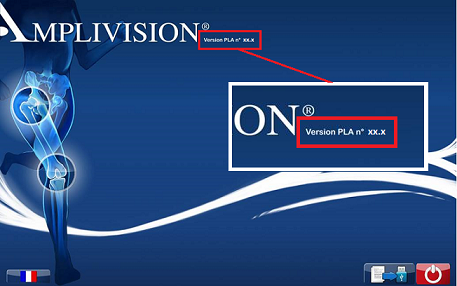
PLA (Paquet Logiciels AMPLITUDE meaning AMPLITUDE Software Package) is a French abbreviation for a configuration (given designation + version) of software installed on your AMPLIVISION® station. You can find the version of the PLA under which your station operates on its home screen, and search for IFUs associated with the corresponding software on this site.
 +33 4 75 41 87 41